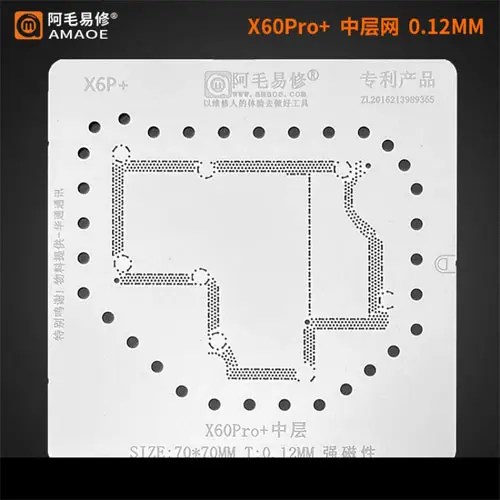
Amaoe Middle Layer Stencil-Original For X60 Pro Plus
High-Quality Middle Layer Stencil for Professionals
The Amaoe Middle Layer Stencil-Original for X60 Pro Plus is a precision-engineered tool designed to elevate your electronics repair process. Whether you’re a DIY enthusiast or a professional technician, this stencil ensures you achieve accurate and reliable results with every repair. Amaoe Middle Layer Stencil-Original For X60 Pro Plus
Durable and Compatible Design
Crafted from high-quality, heat-resistant materials, this middle layer stencil offers exceptional durability and longevity. Its precise fit ensures compatibility with the X60 Pro Plus, making it an indispensable tool for delicate soldering tasks and rework projects. Amaoe Middle Layer Stencil-Original For X60 Pro Plus
Efficient and Easy to Use
Experience seamless functionality with this original stencil. It simplifies complex repairs, allowing you to work efficiently without compromising on accuracy. Perfect for tackling microchip placement, soldering, or other intricate processes, it’s the ideal companion for those who demand precision in their work. Amaoe Middle Layer Stencil-Original For X60 Pro Plus
The Amaoe X6P+ Middle Layer BGA Reballing Stencil is a high-precision professional repair tool specifically engineered for the Vivo X60 Pro+ (Plus). In the world of microsoldering, particularly with modern “sandwich” motherboard designs, a middle layer stencil is critical for rejoining the upper and lower logic boards after a separation (often required for CPU or baseband repair). Amaoe Middle Layer Stencil-Original For X60 Pro Plus
Amaoe is widely regarded as the industry standard for these stencils due to their use of high-quality Japanese steel and laser-cutting technology that prevents the “bulging” common in cheaper alternatives. Amaoe Middle Layer Stencil-Original For X60 Pro Plus
Technical Specifications: Amaoe X6P+
The following table summarizes the primary specifications for the original Amaoe stencil designed for the Vivo X60 Pro Plus.
| Feature | Specification Details |
| Brand | Amaoe (Authentic/Original) |
| Model Number | X6P+ |
| Target Device | Vivo X60 Pro+ (Plus) |
| Primary Application | Motherboard Middle Layer Reballing / Tin Planting |
| Material | High-Grade Japanese Stainless Steel |
| Stencil Thickness | $0.12\text{ mm}$ |
| Aperture Type | High-precision Square Hole (Laser-cut) |
| Heat Resistance | High-temperature resistant (Anti-deformation) |
| Alignment Style | Model-specific fixed-position pattern |
| Finish | Smooth, Burr-free edges for easy removal |
| Weight | Approximately $0.01\text{ kg} – 0.05\text{ kg}$ |
| Reusability | Professional grade / Multi-use |
Key Features & Professional Advantages
1. Precision Laser-Cut Square Holes
Unlike older circular-hole stencils, Amaoe uses square-hole technology. This design allows the solder paste to be released more easily when the stencil is lifted, preventing “ghosting” or smeared solder balls. This is vital for the Vivo X60 Pro+, which has a high density of connection points on its middle frame.
2. $0.12\text{ mm}$ Optimal Thickness
The thickness is mathematically balanced at $0.12\text{ mm}$. If a stencil is too thin, it warps under the heat of a hot air gun ($300\text{°C} – 350\text{°C}$). If it is too thick, the resulting solder balls are too large, leading to shorts when the two layers of the motherboard are pressed back together.
3. Anti-Warping Material
The “Original” Amaoe line uses a specific alloy of stainless steel that has a low coefficient of thermal expansion. This ensures that even when you apply direct heat to melt the solder paste into balls, the stencil remains flat against the PCB, ensuring uniform ball height across the entire board.
4. Model-Specific Design
The X6P+ is not a universal stencil. It is mapped exactly to the trace layout of the Vivo X60 Pro Plus. This includes specific cutouts for the middle frame’s interconnecting pads, ensuring that every signal—from the Snapdragon 888’s power delivery to the camera data lines—is perfectly restored.
Usage Recommendations
To achieve the best results with this stencil, technicians generally follow these parameters:
-
Solder Paste: Use high-quality $183\text{°C}$ (Leaded) or $138\text{°C}$ (Low-melt) solder paste depending on the specific repair requirements.
-
Air Station Settings: Set your hot air station to approximately $300\text{°C} – 330\text{°C}$ with low airflow to prevent the stencil from lifting or the paste from blowing away.
-
Cleaning: Use 99% Isopropyl Alcohol (IPA) to clean the stencil immediately after use to prevent dried flux from clogging the $0.12\text{ mm}$ apertures.
More Products : https://gaffarmarketdelhi.com