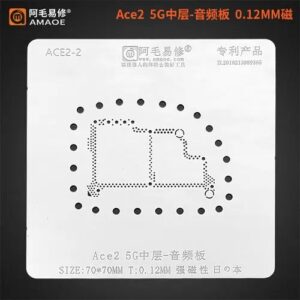
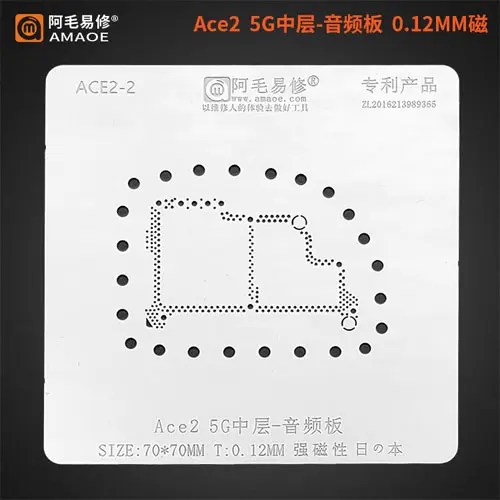
Amaoe Middle Layer Stencil-Original For Ace2
Enhance Precision with Amaoe Middle Layer Stencil
Designed specifically for the Ace2, the original Amaoe Middle Layer Stencil-Original For Ace2 ensures unmatched accuracy in repairs and customizations. Whether you’re a professional technician or a DIY enthusiast, this stencil offers exceptional durability and precision to elevate your experience. Amaoe Middle Layer Stencil-Original For Ace2
Durable Construction for Reliable Results
Crafted from high-quality materials, the Amaoe stencil is built to last and withstand repeated use. Its expertly engineered middle layer guarantees optimal alignment and performance, making it a dependable tool for sensitive tasks. Amaoe Middle Layer Stencil-Original For Ace2
A Perfect Fit for Ace2 Devices
Tailored for the Ace2, this stencil is specifically designed to meet the exact specifications of your device. With seamless compatibility, you can trust it to deliver flawless results while maintaining the integrity of your Ace2. Amaoe Middle Layer Stencil-Original For Ace2
The Amaoe Middle Layer Stencil for the OnePlus Ace 2 (also referred to as the OPPO OnePlus Ace2 5G) is a specialized high-precision tool designed for professional mobile motherboard repair. Specifically, this stencil is used for “reballing” the middle board layers or the audio board ICs—a critical process when a device has suffered from “sandwich” board separation, drop damage, or internal soldering fatigue. Amaoe Middle Layer Stencil-Original For Ace2
Below is a comprehensive breakdown of the specifications, material science, and functional features of the original Amaoe Ace2 stencil. Amaoe Middle Layer Stencil-Original For Ace2
Technical Specifications: Amaoe Ace2 Middle Layer Stencil
| Feature | Specification Details |
| Brand | Amaoe (Original / Authentic) |
| Model Compatibility | OnePlus Ace 2 / OnePlus Ace 2 5G / OPPO Ace2 |
| Stencil Type | Middle Layer / Audio Board BGA Reballing Stencil |
| Material | High-Grade Japanese Stainless Steel (304/316 grade equivalent) |
| Thickness | $0.12\text{ mm}$ (Standard precision for 5G logic boards) |
| Hole Design | Square Hole (Laser-cut for anti-bridge protection) |
| Heat Resistance | Up to $450\text{°C}$ (Industrial soldering standard) |
| Corrosion Resistance | High (Acid and Alkali resistant for flux compatibility) |
| Manufacturing Process | CNC Laser Etching & High-Speed Polishing |
| Dimensions | Approx. $80\text{ mm} \times 80\text{ mm}$ (Varies by specific batch) |
Core Functional Features
1. High-Precision Square Hole Technology
Unlike older circular apertures, the Amaoe Ace2 stencil utilizes square holes. This is a deliberate engineering choice to:
-
Improve Tin Release: Solder paste releases more cleanly from square corners compared to round edges, preventing “stuck” solder.
-
Uniform Ball Formation: It ensures that every BGA (Ball Grid Array) point on the Ace2 middle layer receives the exact same volume of solder. Amaoe Middle Layer Stencil-Original For Ace2
2. $0.12\text{ mm}$ Ultra-Thin Design
Modern smartphones like the Ace 2 use stacked motherboards (sandwich boards). The spacing between these layers is extremely tight. A $0.12\text{ mm}$ thickness is the “sweet spot” for reballing; it is thick enough to provide structural integrity against heat warping but thin enough to prevent over-depositing solder, which causes shorts between the dense pins. Amaoe Middle Layer Stencil-Original For Ace2
3. Japanese Imported Steel
Amaoe uses high-quality steel sheets often sourced from Japan. This material has a high “memory” property, meaning after it is heated by a hot air gun (which causes the metal to expand), it returns to its original flat shape upon cooling. This prevents the “bulging” effect that cheaper stencils suffer from after just a few uses. Amaoe Middle Layer Stencil-Original For Ace2
Detailed Application Guide
The Ace 2 motherboard architecture is complex. The middle layer connects the logic processing unit with the power and communication modules.
When is this stencil required?
-
WiFi/Bluetooth Failure: Often caused by the middle layer solder joints cracking.
-
No Sound/Audio IC Issues: The “Ace2-2” variant of this stencil specifically targets the audio board components.
-
Device Not Charging/Booting: If the sandwich board loses connection, the power rails won’t reach the CPU.
Recommended Tool Synergy
To achieve the best results with this stencil, the following parameters are recommended:
-
Solder Paste: $183\text{°C}$ or $138\text{°C}$ (Low-melt for middle layers to prevent damaging internal components).
-
Hot Air Station Temperature: Set between $320\text{°C}$ and $350\text{°C}$.
-
Air Flow: Low to medium to prevent the stencil from lifting.
Why Choose “Original” Amaoe?
The market is flooded with “AA” or “1:1” copies. However, the original Amaoe stencil is preferred by technicians because of the Aperture Chamfering. In original stencils, the walls of the holes are polished smooth at a microscopic level. In clones, the laser-cut edges are often jagged, which “grabs” the solder paste and results in missing balls or uneven heights across the chip. Amaoe Middle Layer Stencil-Original For Ace2
Maintenance Tip: Always clean the stencil with 99.9% Isopropyl Alcohol (IPA) immediately after use. If solder paste hardens in the $0.12\text{ mm}$ holes, it can be extremely difficult to remove without damaging the precision edges of the square apertures. Amaoe Middle Layer Stencil-Original For Ace2
More Products : https://gaffarmarketdelhi.com