Amaoe Stencil-Original IP X/XSMAX/XR-A12
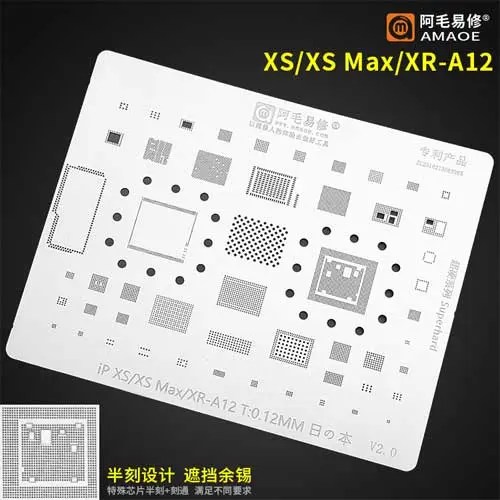
The Amaoe Stencil-Original IP X/XSMAX/XR-A12 reballing stencil is a professional-grade precision tool specifically engineered for the repair of the Apple A12 Bionic chipset and associated logic board components. This stencil is a staple for micro-soldering technicians working on the iPhone X, XS, XS Max, and XR series. Amaoe Stencil-Original IP X/XSMAX/XR-A12
Below are the comprehensive technical specifications and details for the Amaoe IP X/XSMAX/XR-A12 stencil.
Technical Specifications Table
| Feature | Specification Details |
| Model Number | Amaoe U-IP6 (IP XS/XS Max/XR-A12) |
| Compatibility | iPhone X, iPhone XS, iPhone XS Max, iPhone XR |
| Target IC | Apple A12 Bionic (CPU), RAM (POP), and Baseband/NAND components |
| Material | High-grade 304 Stainless Steel (Anti-magnetic/Acid-resistant) |
| Thickness | 0.12 mm (Standard Precision) |
| Manufacturing Process | High-speed Laser Cutting with Electro-polishing |
| Hole Shape | Square holes with rounded corners (to prevent solder sticking) |
| Heat Resistance | High (Specifically treated to minimize thermal expansion/deformation) |
| Net Weight | Approx. 10g – 15g |
| Dimensions | 100mm x 80mm (Approximate outer sheet size) |
| Application | BGA Reballing, Chip Tin Planting, and Logic Board Rework |
Core Design Features
1. Precision 0.12mm Thickness
The choice of 0.12mm thickness is deliberate. It provides the ideal balance between structural rigidity and solder paste volume. This thickness ensures that the resulting solder balls are uniform in height, which is critical for the “sandwich” board design (Double-stacked logic boards) found in the iPhone X series and newer.
2. Heat Deformation Resistance
Amaoe utilizes a proprietary cooling and heat-treatment process during manufacturing. This allows the stencil to undergo multiple heating cycles with a hot air gun (typically at 330°C to 380°C) without warping or “bulging.” A flat stencil is essential to prevent solder bridging (shorts) between the dense pins of the A12 Bionic chip. Amaoe Stencil-Original IP X/XSMAX/XR-A12
3. Square-Hole Technology
Unlike cheaper stencils that use circular etched holes, the Amaoe U-IP6 features square holes with micro-radiused corners. This design assists in:
-
Easier Release: Solder paste releases more cleanly from square apertures after “planting.” Amaoe Stencil-Original IP X/XSMAX/XR-A12
-
Ball Uniformity: It ensures the solder balls are perfectly centered on the BGA pads. Amaoe Stencil-Original IP X/XSMAX/XR-A12
Component Support & Layout
The “A12” series stencil is often a multi-utility sheet. While the primary focus is the A12 Bionic CPU, the stencil typically includes dedicated sections for:
-
A12 CPU & RAM: The large grid pattern required for the main processor. Amaoe Stencil-Original IP X/XSMAX/XR-A12
-
NAND Flash: For memory upgrades or data recovery reballing.
-
Baseband CPU: Critical for resolving “No Service” or cellular issues.
-
Audio IC & Power Management (PMIC): Smaller grids for peripheral chipsets.
Usage Guide for Technicians
To achieve professional results with the Amaoe A12 stencil, follow these industry-standard steps:
-
Preparation: Clean the IC surface thoroughly using a soldering iron and wick to ensure the pads are flat. Clean any residual flux with Isopropyl Alcohol (99%).
-
Alignment: Place the chip under the stencil. Use a microscope to ensure every pad is perfectly centered within the stencil’s laser-cut holes.
-
Paste Application: Apply high-quality solder paste (usually 183°C leaded or 138°C low-melt depending on the specific repair). Use a firm spatula to spread the paste evenly.
-
Cleaning Excess: Wipe the top of the stencil clean so no excess paste remains outside the holes.
-
Heating: Hold the stencil down with tweezers. Set your rework station to low airflow to prevent the stencil from moving. Heat in a circular motion until the solder “shines” and forms perfect spheres.
-
Release: Allow it to cool for a few seconds before gently pushing the chip out of the stencil.
Maintenance Tips
-
Cleaning: Always clean the stencil immediately after use with a soft brush and PCB cleaner. Dried solder paste can clog the 0.12mm apertures.
-
Storage: Store the stencil flat. Even a small bend in a 0.12mm sheet can ruin its alignment capabilities.
High-Quality Repair Tool for Professionals
The Amaoe Stencil-Original IP X/XSMAX/XR-A12 is designed for technicians seeking accuracy and efficiency in mobile device repairs. Manufactured using durable materials, this stencil ensures long-lasting performance while providing precise alignment compatible with specific models.
Enhanced Precision for Complex Repairs
Whether you’re working on iPhone X, XS Max, or XR models, this stencil is engineered to simplify the repair process by improving motherboard alignment and soldering tasks. Its accurate grid layout minimizes errors, saving you valuable time without compromising on quality.
Versatility and Professional Results
This stencil supports A12 chip repairs, making it an essential tool for handling intricate projects with ease. Its compact design is perfect for professional workstations, ensuring reliable results that meet the demands of expert technicians.

More Products : https://gaffarmarketdelhi.com
FOLLOW US : https://www.instagram.com/gaffarmarketdelhi_official?igsh=MTM2cHM0Ynd4Z2tkNQ%3D%3D&utm_source=qr