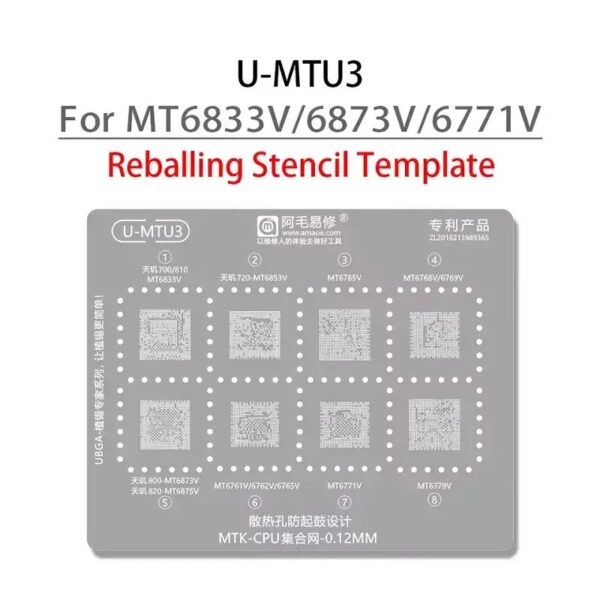
Amaoe U-MTU3 BGA Reballing Stencil-Original
Achieve Professional-Quality Results with Ease
The Amaoe U-MTU3 BGA Reballing Stencil-Original is your go-to solution for precision and efficiency in the intricate world of BGA reballing. Designed for professionals and enthusiasts alike, this stencil guarantees outstanding results for chip repair and rework tasks. Amaoe U-MTU3 BGA Reballing Stencil-Original
Durable Build, Exceptional Performance
Made with high-quality materials, this stencil offers long-lasting durability and reliability even after repeated use. Whether you’re restoring chips on smartphones, computers, or other electronic devices, the Amaoe U-MTU3 delivers precision you can trust. Amaoe U-MTU3 BGA Reballing Stencil-Original
User-Friendly, Compatible Design
The stencil’s carefully designed layout ensures compatibility with a wide range of chip models, making it a versatile addition to your toolkit. Its easy-to-use features allow for seamless handling, taking the hassle out of intricate reballing procedures. Amaoe U-MTU3 BGA Reballing Stencil-Original
Gemini said
The Amaoe U-MTU3 is a professional-grade BGA (Ball Grid Array) reballing stencil specifically engineered for MediaTek (MTK) processors and memory chips. Part of the “U-Series” (Universal/Ultra-thin), this stencil is a staple in high-end mobile repair labs for technicians performing CPU swaps, RAM upgrades, or fixing “dead” boot issues caused by fractured solder joints. Amaoe U-MTU3 BGA Reballing Stencil-Original
Product Overview
The U-MTU3 is crafted using high-precision laser-cutting technology on Japanese stainless steel. Unlike generic stencils, the U-MTU3 features a “centralized” design, meaning it groups multiple high-performance MTK chipsets onto a single template. This reduces the need for multiple stencils when working on modern 5G devices. Amaoe U-MTU3 BGA Reballing Stencil-Original
Full Specifications Table
Detailed Chip Compatibility List
The U-MTU3 is particularly valued for its support of the MediaTek Dimensity and high-end Helio series. Below are the specific IC models typically found on this stencil:
-
Dimensity 700 Series: MT6833V (Very common in budget 5G phones).
-
Dimensity 720 / 800U: MT6853V.
-
Dimensity 800 / 820: MT6873V / MT6875V.
-
Helio G90 / G95: MT6785V.
-
Helio G80 / G85: MT6769V.
-
Helio P90: MT6779V.
-
Memory (RAM): Specific footprints for LPDDR4/4X chips paired with the above CPUs.
Key Technical Features
1. 0.12mm Ultra-Thin Profile
The thickness of a stencil determines the volume of solder paste deposited. At 0.12mm, the U-MTU3 provides the perfect balance: it is thin enough to prevent solder “bridging” (where two pads join accidentally) but thick enough to ensure the solder balls have sufficient height to form a strong mechanical bond with the motherboard.
2. Square-Hole Technology
While older stencils used round holes, Amaoe utilizes square apertures. This design choice is critical because:
-
It allows for easier “demolding” (removing the stencil after applying paste).
-
It provides a larger surface area for the solder paste to grip the chip pad during the heating process.
3. Anti-Bulging Thermal Design
Micro-soldering requires high heat (often 300°C to 350°C). Generic stencils often “pop” or bulge upward when heated, causing solder to smear. The U-MTU3 is made from specialized steel with high thermal stability, ensuring it stays flat against the chip even under direct hot air.
4. Precision Alignment
The laser-cut holes are accurate to the micron level. This is essential for modern MTK CPUs which have hundreds of tiny pads spaced less than 0.5mm apart. Even a slight offset would result in a failed repair.
Maintenance and Usage Tips
To ensure the longevity of your Amaoe U-MTU3 stencil, follow these industry-standard practices:
-
Cleaning: Always clean the stencil with PCB cleaner or Isopropyl Alcohol (IPA) immediately after use. Dried solder paste in the micro-holes is difficult to remove and can ruin future alignments.
-
Storage: Store the stencil flat. Avoid bending it, as even a slight crease can prevent the stencil from sitting flush on a chip.
-
Solder Paste: Use high-quality “No-Clean” solder paste (usually 183°C or 138°C, depending on the chip sensitivity).

More Products : https://gaffarmarketdelhi.com