
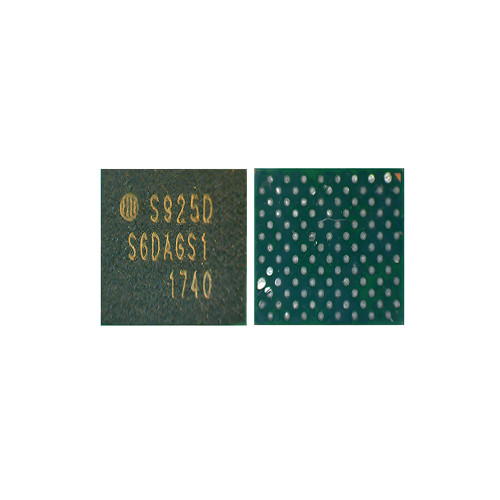
Mobile Phone IC For S925D Original
The S925D is a specialized Power Management Integrated Circuit (PMIC), commonly referred to in the technical repair community as a “Sub-PMIC” or “Secondary PMIC.” While a primary PMIC handles general system power, the S925D is engineered to manage high-precision power rails for specific high-performance components, most notably found in Samsung’s flagship S-series and Note-series devices.
As mobile processors and displays become more demanding, manufacturers offload specific voltage regulations to chips like the S925D to reduce the thermal load on the main board and improve power efficiency.
Technical Specifications: S925D IC
| Feature | Specification Detail |
| Model Number | S925D (Full PN: S2MPU08) |
| Manufacturer | Samsung (Proprietary Silicon) |
| Component Type | Secondary PMIC / Display Power IC |
| Package Type | 48-Pin BGA (Ball Grid Array) |
| Input Voltage ($V_{IN}$) | $3.4\text{V} \text{ to } 4.5\text{V}$ (Typical Battery Operating Range) |
| Output Rails | 4 Buck Converters / 6 LDOs |
| Communication | $I^2C$ / SPMI (System Power Management Interface) |
| Operating Temp | $-30\degree\text{C} \text{ to } +85\degree\text{C}$ |
| Max Efficiency | 94% (Optimized for low-power standby) |
| Key Protections | Thermal Shutdown, Over-Voltage (OVP), Over-Current (OCP) |
Core Functional Roles
The S925D is a “slave” IC that follows the instructions of the main Application Processor (AP). Its roles are highly specific:
1. Display Power (OLED Bias)
The S925D is frequently responsible for generating the Display Bias voltages. High-resolution OLED screens require extremely stable positive and negative voltage rails (typically $+4.6\text{V}$ and $-4.4\text{V}$) to illuminate pixels without flickering. The S925D uses high-frequency switching to ensure these rails remain constant even as the screen brightness changes.
2. Camera System Power
Modern smartphones use multiple camera sensors (Wide, Ultra-wide, Telephoto). The S925D often provides the VDD (Core Voltage) for these sensors. Because camera sensors are highly sensitive to electrical noise, the S925D’s LDO (Low-Dropout) regulators are designed to provide “clean” power that prevents visual artifacts in photos.
3. Power Sequencing
During the boot-up process, the S925D ensures that peripheral components are powered on in the correct order. If a component like the Iris Scanner or Fingerprint Sensor receives power too early or too late, the device may trigger a security kernel panic and fail to boot.
Common Signs of a Defective S925D
Technicians usually look for the S925D when a phone has “Partial Life” symptoms—meaning it turns on, but key features are missing.
-
Black Screen (No Graphics): The phone vibrates, receives calls, and is detected by a computer, but the screen is dead. This often points to the S925D failing to produce the OLED bias voltage.
-
Camera “Failed” Error: If the camera app crashes immediately or shows a black preview, the S925D may have a blown LDO rail dedicated to the camera module.
-
Localized Overheating: Using a thermal camera, a shorted S925D will show as a “hot spot” (often exceeding $60\degree\text{C}$) as soon as the battery is connected, even before pressing the power button.
-
Stuck Boot Current: On a DC Power Supply, a phone with a faulty S925D might draw a steady current of $0.15\text{A}$ to $0.25\text{A}$ and never progress to the full boot sequence.
Repair and Installation Guide
Replacing the S925D requires advanced micro-soldering skills due to its BGA-48 footprint and its proximity to the CPU.
-
Shielding: Always use Kapton tape or thick aluminum foil to shield the main CPU and NAND Flash. These components are often “underfilled” with glue, and the heat required to remove the S925D can cause the glue to expand and “pop” the CPU balls.
-
Heat Settings: Use a hot air station at $340\degree\text{C} – 355\degree\text{C}$. The S925D is relatively small, so keep the airflow at a medium-low setting ($30-40\%$) to prevent it from blowing into other components.
-
Orientation: Locate the “Pin 1” dot on the corner of the chip. Align it with the triangle or dot marked on the motherboard’s silk-screen.
-
Reballing: If using a chip from a donor board, use a 0.35mm pitch stencil. It is recommended to use $183\degree\text{C}$ leaded solder paste for the replacement to ensure the chip “seats” more easily than it would with factory lead-free solder.